
Nutrition · Meal scan
The AI calorie counter built to say what was hardest to judge.
Made in the UK by Bolt Business Limited, company number 16864050 · No ads, no trackers
Health AI is an AI calorie counter and food scanner for iPhone. Photograph your plate and the AI reading it is asked to estimate the calories, protein, carbs and fat part by part, and to note what it was least sure of. Nothing is logged until you check it and save it.
- 3 days free, with 30 scans
- Then £9.99 a month, with 200 scans
- Cancel any time in your Apple account
How it works
How does an AI calorie counter work?
A photo calorie counter starts with a picture, and an AI model estimates what is in the meal. Health AI's scan is asked to work out what the dish is made of and judge each part's weight against the plate or cutlery beside it; the app adds the parts up. You check the result before anything is saved.
What it is asked to count, from the oil in the pan to the milk in your tea
Rather than one guess for the whole plate, the scan is asked to estimate everything in the photo as served, the whole portion rather than a typical one, part by part, and the app adds the parts up.
| On the plate | What the scan is asked to do |
|---|---|
| Each part: the meat, the rice, the sauce | Estimate it on its own, at its cooked weight as served |
| How big it is | Judge it against a UK dinner plate, about 26 cm across, and any cutlery, hands, cups or cans in the photo |
| Oil, butter, dressing, sauce, spreads, sugar or milk in a drink | Count them, because they are easy to miss |
| Bones, shells, skins, stones and peel | Leave them out, because you don't eat them |
| Something it can't see | Assume the usual UK version, such as semi-skimmed milk, and say so in the note |
| A branded product or a chain's menu item it knows | Use its published figures, for the size shown |
The NHS's advice on counting calories asks you to remember the oil and spreads you cooked with, toppings and sauces. The scan is told to count them too.
Tips for a better estimate, from the scanner's own help
| Scanning | Do this |
|---|---|
| A plate | Get the whole plate in frame, from above. |
| A plate | Leave something for scale: cutlery, a hand, the plate's edge. |
| A plate | Find good light. Portion size is the hardest part to judge. |
| A label | Fill the frame with the panel, not the whole box. |
| A label | Hold it flat, and watch for glare on shiny packaging. |
What is a calorie scanner?
A calorie scanner is the camera in a calorie counter that reads your food for you: a barcode, a nutrition label or a photo of the plate. In Health AI, a barcode is looked up in food databases and never uses a scan, while a label or a plate is read by AI and uses one of your scans.
A plate, a label or a barcode: which to point it at
| Point the camera at | What you get | Uses a scan |
|---|---|---|
| A plate, in Food | An estimate of everything in the photo | Yes |
| A nutrition panel, in Label | The printed figures as whole numbers, except salt, per portion where the label gives one | Yes |
| A barcode, in Barcode | The product's published figures, from Open Food Facts or USDA | No |
| A photo you took earlier | Read the same way, from the gallery button beside the shutter | Yes |
For anything packaged, Label is usually the closest way to log, because the numbers are read, not estimated. It is told to use kcal, not kJ, and salt as printed.
30 scans in the trial, 200 a month after, and when one is given back
| What you get | 3 free days | £9.99 a month | If you stop paying |
|---|---|---|---|
| Meal and label scans | 30 | 200 a month | No |
| Barcodes, search and logging by hand | Yes | Yes | Yes |
A scan the scanner fails to answer is given back; a photo it reads as not food still counts. Scans don't roll over, and each month you pay brings a fresh 200. When they run out, the camera offers to log the meal by hand, with your photo, or to scan a barcode.
- 3 days free, with 30 scans
- Then £9.99 a month, with 200 scans
- Cancel any time in your Apple account
Cancel at least 24 hours before the three days are up and you pay nothing.
Accuracy
How accurate is an AI calorie counter?
It is an estimate, and portion size is the hardest part. A photo shows how big a portion looks, not the oil it was cooked in or how deep the bowl is. A Health AI scan is asked to note what it was least sure of, and for anything packaged, the label or barcode gives the published figures instead.
Which way of logging gets closest to the real number
| Way to log | How close it gets |
|---|---|
| Food label | The printed figures, read off the pack. Check the portion is yours. |
| Barcode | The product's published figures, if the database has them right. |
| Search, weighed | Reference values for that food, at the weight you type. |
| Photo of the plate | An estimate. Portion size and hidden oil are the usual misses. |
The NHS warns that a pack's portion may not be the one you eat. Daily targets, UK food search and barcodes are on the calorie counter app page.
What it does when it can't tell
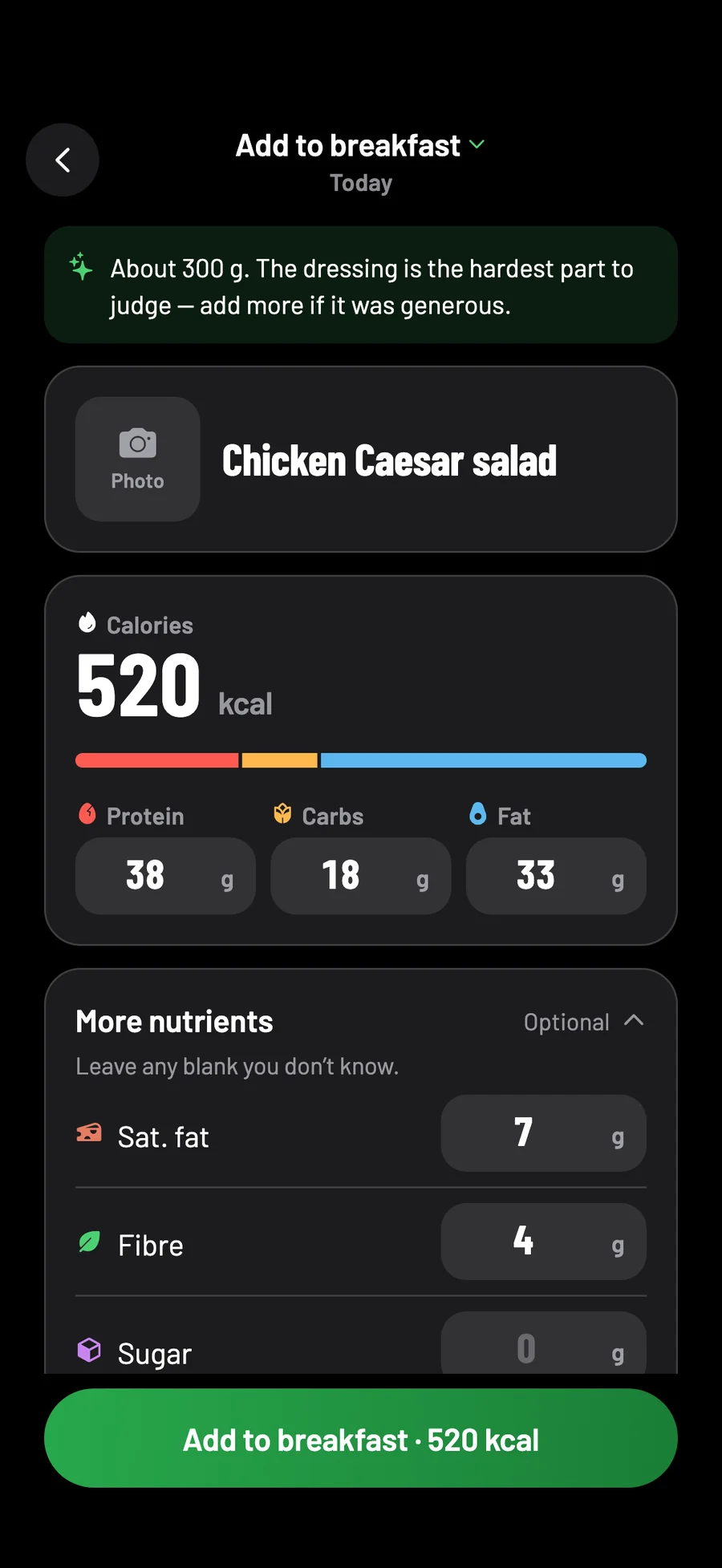
Fibre, sugar, salt and saturated fat are left blank when the scan can't tell, never put down as 0, because 0 would mean none. It is asked to say in its note whether it read a label or estimated from the photo, and never to call a food good, bad, healthy or unhealthy; a note that does call a food healthy or unhealthy is swapped for a plain one.
A photo it reads as having no food, drink or label in it is turned down, with a short line on what it shows instead, or: "That doesn't look like food or a nutrition label."
Nothing is logged until you check it and save it
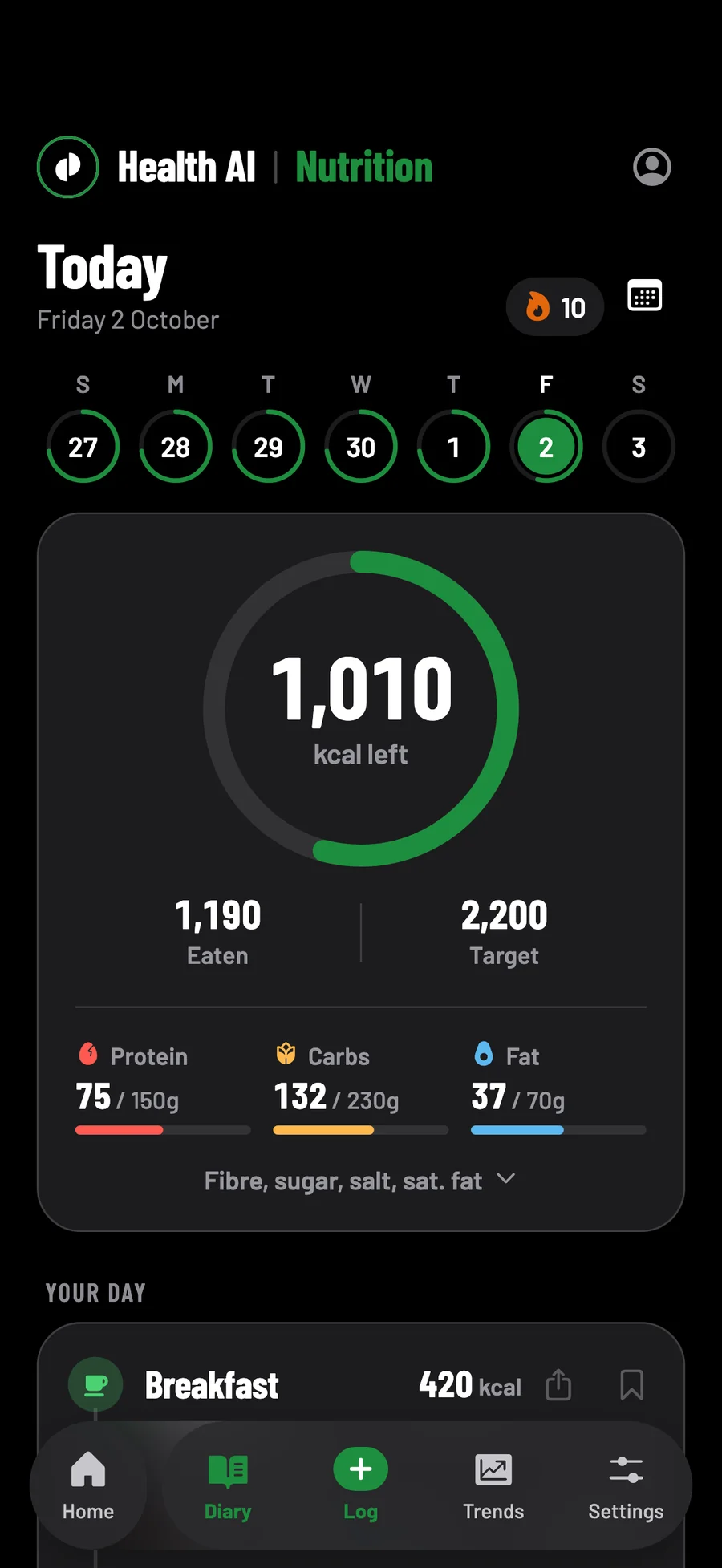
The camera closes on the shutter and the scan carries on as a card in your diary: Analysing photo, then the food and its figures. Save logs it to the meal shown, which you can change. Edit opens every figure to change first, the bookmark keeps it as a saved food without logging it, and the cross throws it away.
With no signal, the photo is kept and the card tries again by itself, twice. Waiting cards are kept on your phone if the app is closed.
What it doesn't do, from voice logging to scanning offline
| If you want | Health AI |
|---|---|
| To log by voice | No. Photograph it, or scan the label or barcode. |
| Each dish in a photo as its own entry | No. Everything in one photo is logged as one entry. |
| To scan with no signal | No. The photo is kept on its card, which tries twice more by itself, then waits for you to tap Try again. |
| To scan without an account | No. Scans are counted per account, so you sign in first. |
Your photo is read, not kept by us, and not trained on
Your photos stay yours.
Not kept by us
The photo is sent to be read and isn't stored by us afterwards. What it read is kept for about an hour, so if your phone asks again, it costs nothing.
No location
A photo from your library has the place it was taken removed on your phone before it is sent.
Not trained on
Google's Gemini reads it, or Anthropic if Google is unavailable, and neither is told who you are. The privacy policy says neither may train on it, and each deletes it after holding it for a limited time to catch abuse.
Switch the scanner off, with the coach, in Settings → Coach and scanner. Read the privacy policy.
One plate, start to finish
A chicken Caesar salad, as the app scans it.
Follow one salad from the photo to the diary
Questions
Meal scan questions, answered.
Is there a free AI calorie counter?
Some have a free tier with a few scans a day. Health AI is three days free with 30 scans, then £9.99 a month with 200, and no adverts. Barcodes never use a scan.
Can AI count calories from a photo?
It can estimate them. A photo shows what is on the plate and roughly how much, but not the oil, so the scan is asked to say what it was least sure of, and you can change any figure.
Do you keep my food photos?
No. The photo is sent to be read and isn't stored by us afterwards, and its location is removed on your phone first. The copy on your phone stays with the meal you save and is never copied to your account. The privacy policy says Google, which reads it, and Anthropic, its backup, may not train on it, and each deletes it after holding it for a limited time to catch abuse.
Can it read nutrition labels?
Yes. In Label, it is told to copy the printed figures, per portion where the label gives one. The app keeps them as whole numbers, except salt, which it shows in grams, as UK labels print it.
What happens when I run out of scans?
The camera offers to log the meal by hand, with your photo, or to scan a barcode, which never uses a scan.
How do I cancel the free trial?
In your iPhone's Settings → your name → Subscriptions. Cancel at least 24 hours before the three days end and you pay nothing.
Coming to the App Store in the UK, for iPhone with iOS 17 or later. Screens show sample data.
Every plate, checked before it's saved.
Meal scans, calories, training and runs in one app, with a coach that reads your last 30 days of food, training and runs.
- 3 days free, with 30 scans
- Then £9.99 a month, with 200 scans
- Cancel any time in your Apple account
Cancel at least 24 hours before the three days are up and you pay nothing.